



Description
Lead Ops: the WordPress plugin to manage leads in a cleaner, safer and more operational way
Lead Ops is a WordPress plugin designed for all sites that do lead generation
and they want to stop treating contacts like a random rain of forms that they hope aren't rubbish.
Its goal is simple: protect forms from spam, save leads in a structured way,
make them readable and usable in the backend e connect the flow to external marketing tools,
without turning WordPress into an unmanageable amusement park.
Unlike classic plugins that do just one thing and then leave you alone in the rest of the chaos,
Lead Ops combines three fundamental aspects in a single flow: protection,
organization of the data e operational/marketing utility.
It was not created to replace a complete CRM, but to solidly cover the most delicate section of the funnel:
lead capture, filtering, qualification and routing.
What does he actually do?
When a user fills out a supported form, Lead Ops intercepts the submission, normalizes the data,
applies protection rules, assigns a status to the lead and saves it in dedicated WordPress tables.
In this way the contact does not remain lost among email notifications, rough payloads or difficult to read screens:
instead it becomes structured data that can be consulted and exported.
For each lead, the plugin can record useful information such as name, email, telephone, origin of the form,
lead status, spam score, reasons for classification, referring page, submit payload
and related operational events. The result is clearer, more concrete and much less based management
on the ancestral method of "well, let's see what has arrived".
Intelligent protection, not blind paranoia
One of the most common problems in lead generation is the double failure: on the one hand spam enters,
on the other hand, overly aggressive filters risk blocking even good contacts. Lead Ops addresses this problem
with a more useful approach: it does not limit itself to brutally deciding “pass/no pass”,
but classifies each lead into three distinct states.
- Valid: lead considered clean and reliable
- Suspicious: lead saved but with risk signals
- Blocked: Lead blocked by protection rules
This allows you to maintain operational visibility even on dubious contacts, reducing false positives
and leaving the administrator a more realistic margin of control. Because yes, in the real world not everything is black or white:
sometimes it's simply "this looks shady, but let's check it out."
Operational anti-spam rules
Lead Ops includes a series of protections designed to be simple but useful in your daily work.
Among the active rules there are honeypot, time trap,
duplicate detection e pattern/keyword detection.
In practice, if a hidden field is filled in, the lead can be blocked.
If the submit arrives too quickly, it can be classified as suspicious.
If emails or contents are duplicated in a short time window, the system reports it.
And if the text contains typical spam patterns, the plugin intervenes accordingly.
Real stuff, not buzzword flavored digital smoke.
Clear and operationally oriented backend
Lead Ops adds a dedicated menu in administration with sections designed to give an immediate reading of the flow.
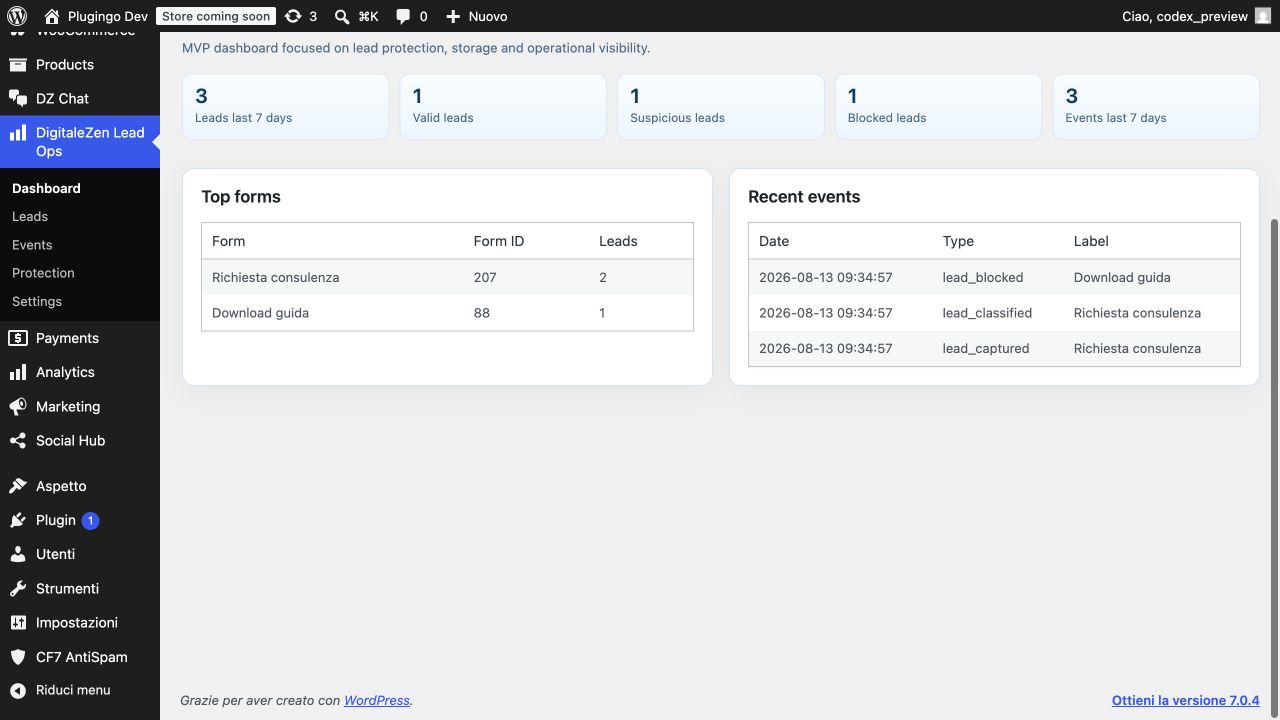
The Dashboards offers a concise overview of leads, events and distribution by state.
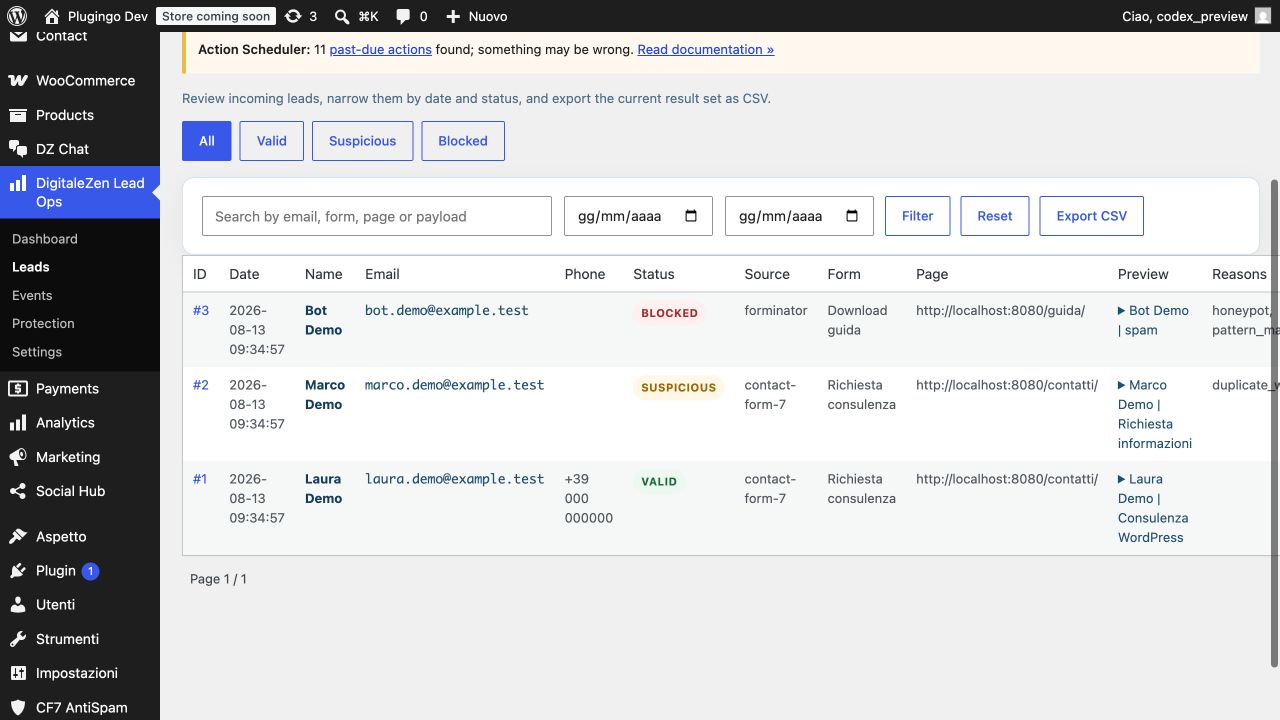
The section Leads shows contacts in a more operational view, with readable columns by name,
email, phone, status, source form, page and payload preview.
The section Events instead collects the history of the plugin's internal events,
useful for understanding what happened and when.
To complete the picture there are the areas Protection e Settings,
from which to manage anti-spam rules, storage, tracking, export and external integrations.
In other words: less time wasted chasing scattered data, more control over what enters your site.
Also useful leads for marketing and automation
Lead Ops doesn't stop at form defense. Once the lead has been collected and classified,
it can also route it to external tools for marketing and automation activities.
The plugin is currently set up for initial integrations with Mailchimp e MailerLite,
with dedicated configurations for API keys, audiences or groups, states to synchronize and segmentation.
This means that you can decide not only if save a lead, but also how use it in your flow:
archive it, read it in admin, export it, synchronize it with an email platform and treat it more intelligently
compared to the usual "a module arrives and then God provides" scheme.
Event tracking and funnel reading
For those who want a broader view of funnel behavior, Lead Ops also records useful events such as
saved leads, suspicious leads, blocked leads, successful or failed CRM syncs,
as well as clicks tracked on CTA, email, telephone and WhatsApp.
If enabled, it can also expose some results on dataLayer,
so as to make the transition between forms, tracking and analysis more readable.
In summary, Lead Ops is not the classic plugin that "saves you a couple of things and then disappears".
It is an intermediate operational level between the form and the CRM, designed to give more order,
more security and more value to the contacts generated by your WordPress site.
Who it is meant for
Lead Ops is ideal for corporate sites, landing pages, lead generation projects,
professionals, agencies and anyone who needs to collect leads in WordPress
without letting spam, duplicates and messy data sabotage your business or marketing work.
It is particularly useful when you want to keep a simple, but quite advanced structure
so as not to have to patch everything up with three plugins, two webhooks and a technical prayer done backwards.
In short
Lead Ops helps you protect forms, classify contacts,
save leads in a structured way, consult them in a tidy backend,
export them e connect them to your marketing tools.
It is a practical solution to transform lead collection from a fragile point in the funnel
a more reliable, readable and operational process.


Reviews
There are no reviews yet.